
In 2025, 57% of professional developers used AI coding assistants at least weekly (Stack Overflow Developer Survey, 2025) — yet the median developer still structures Claude Code sessions the way they write a Slack message: conversationally, iteratively, and without upfront constraints. That gap between tool capability and prompting discipline is the single largest driver of agentic coding failures.
Claude Code is not a code suggestion panel. It is a repository-scale autonomous agent that reads complete codebases, executes shell commands, chains multi-file operations across sessions, and writes destructive changes to disk without a confirmation screen. A vague instruction like “refactor the auth layer” gives the agent a blank mandate to touch every file it deems relevant — a failure pattern termed code drift, where the agent arbitrarily modifies files, removes features, or introduces architectural violations the developer never requested.
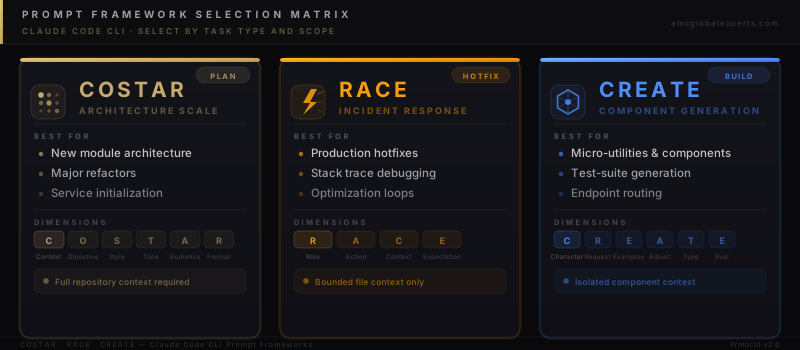
The engineers who have operationalized Claude Code at production scale share one discipline: structured Prompt Engineering Frameworks that define scope, persona, success criteria, and output format before the agent executes a single character. This research report breaks down the three most field-validated frameworks — COSTAR for architecture-scale feature engineering, RACE for precision incident response, and CREATE for clean component generation — and provides a production-ready Bash script that deploys all three into your repository’s CLAUDE.md file, the core system instruction layer Claude Code reads on every initialization.
Why Vague Instructions Break Agentic Code Agents
The Code Drift Problem in Multi-File Refactors
Code drift occurs when an agentic AI tool interprets a loosely scoped instruction as permission to modify files and logic beyond the stated objective. A developer who asks Claude Code to “clean up the payment module” without specifying boundaries may find the agent has also refactored shared utilities, updated unrelated test fixtures, and removed a conditional intentionally preserved as a technical debt marker.
This is not a hallucination problem — it is a scope problem. Claude Code reads the full context of your repository and reasons about the most complete solution to a stated goal. Without explicit boundaries, the agent’s definition of “complete” frequently exceeds the developer’s intent. Every file modified outside the stated scope is a potential regression, a broken test, or a removed feature that surfaces three sprints later.
The structural solution is pre-execution constraint: defining which files are in scope, which are read-only, and what the success condition looks like before the agent begins. Prompt frameworks encode these constraints systematically.
Repository Context and Token Efficiency
When Claude Code initializes on a large codebase — 50,000+ lines across 200+ files — it consumes significant context window capacity building its internal model of the repository structure. An unguided session compounds this by prompting the agent to scan broadly before acting narrowly. The result is slower responses, higher API token consumption, and reduced model accuracy as available context fills with tangential files.
Structured frameworks front-load the relevant context. The RACE framework, for example, includes a dedicated Context field where you paste the exact stack trace or error log — rather than asking Claude to find it. This reduces repository scan cost, keeps the context window focused on the failing code path, and produces faster, more accurate diagnostics.
COSTAR: The Architecture-Scale Instruction Framework
When COSTAR Applies
COSTAR is the right framework when the task requires the agent to understand the full operational context of a system before producing output. New module architecture, service initialization, technology migration planning, and major refactors all qualify. If the work would take a senior engineer more than two hours to scope mentally, COSTAR provides the rails.
The six COSTAR dimensions map directly to the questions Claude Code needs answered before it can act with architectural precision. Context establishes the technology landscape and constraints. Objective pins the exact functional outcome. Style specifies the coding paradigm — functional, object-oriented, clean architecture, TDD. Tone in a coding context translates to defensive posture: explicit error handling, zero external dependencies, or specific testing requirements. Audience identifies who consumes the output, from junior developers to CI/CD pipelines with strict linting rules. Response Format constrains the structural deliverable: specific folder organization, separation of UI and logic layers, or a PR-ready diff structure.
COSTAR in Practice: Building a New Authentication Module
An unstructured prompt might read: “Add JWT auth to the API.” This gives Claude Code twelve legitimate architectural interpretations, no library constraints, and no testing requirement. A COSTAR-structured equivalent forces precision at every decision point:
Context: Node.js Express API, TypeScript strict mode, existing users table in PostgreSQL via Prisma ORM, no existing auth layer.
Objective: Implement stateless JWT authentication with refresh token rotation. Access tokens expire in 15 minutes; refresh tokens in 7 days.
Style: Functional programming with explicit error types. No class-based controllers.
Tone: Defensive — every auth failure path returns a typed error response, never throws uncaught exceptions.
Audience: Consumed by mobile clients and by an automated security scanner in CI that flags 4xx responses without descriptive error bodies.
Response Format: Three files — src/auth/tokens.ts, src/auth/middleware.ts, src/auth/routes.ts. Do not modify existing route handlers.
That final instruction — “Do not modify existing route handlers” — is a code drift guard embedded directly in the Response Format field. COSTAR makes this constraint natural rather than an afterthought. Scope violation is architecturally impossible when the output structure is pre-specified.
RACE: Terminal-First Emergency Response
The Anatomy of a Precision Incident Prompt
Production incidents have no room for conversational iteration. When a memory leak surfaces at 2 AM or a database query degrades to 14-second execution time, the cost of each agent response cycle is measured in user impact. RACE is engineered for exactly this scenario: precise role assignment, a single programmatic action verb, raw environmental data, and a binary success condition.
The four RACE dimensions compress into a single focused command. Role establishes the specialized engineering persona with the exact expertise required — not “senior developer” but “Senior PostgreSQL Database Administrator specializing in lock contention and deadlock resolution.” Action uses a precise verb: Isolate, Patch, Profile, Audit, or Secure. Context contains the raw artifact — copy-pasted stack traces, EXPLAIN ANALYZE output, server error logs, or environment configs. Expectation defines done in measurable terms: the query executes in under 200ms and all integration tests in ./tests/db pass.
The Role field deserves particular attention. Claude Code adjusts its reasoning strategy based on the persona it’s given. A “Senior Systems Optimization Specialist” approaches a memory leak differently than a “Backend Node.js Developer” — one profiles heap allocations and garbage collection pressure; the other checks for missing cleanup handlers. Role precision is diagnostic precision.
RACE for Performance Optimization Loops
RACE is equally valuable for non-emergency optimization work where scope must remain tightly contained. A developer optimizing a slow Elasticsearch query should not give Claude Code access to the full search service codebase. RACE’s Context field pins the agent to the specific query, its EXPLAIN output, and the index configuration — nothing else. The Expectation field sets the benchmark: P95 response time under 80ms at current production load.
This containment discipline is what differentiates senior agentic engineering from vibe coding. An agent with bounded context is more accurate, faster, and produces changes that are easier to review in isolation. The developer reviews a 40-line patch, not a 400-line multi-file diff of unclear necessity.
CREATE: Isolated Component and Utility Generation
Character as Scope Limiter
CREATE shares COSTAR’s attention to persona but applies it at micro-utility scale. The Character field in CREATE functions primarily as a scope limiter — “Accessibility-focused React Frontend Engineer” tells Claude Code to apply WCAG 2.1 AA standards, avoid CSS-in-JS performance anti-patterns, and keep component logic separated from presentation. That single phrase encodes half a code review checklist without repeating it explicitly.
The Adjustments field enforces hard constraints that prevent scope creep at the component level: “Do not install external libraries,” “Use pure Tailwind CSS utility classes only,” “Do not create a new context provider.” Each Adjustment eliminates an entire class of code drift from the output. Senior engineers who use CREATE regularly maintain a personal library of high-value Adjustments accumulated from past agent sessions that went wrong.
Evaluation-First Prompting for Test Generation
CREATE’s most underused dimension is Evaluation. By specifying how output will be measured — “must achieve 100% statement test coverage,” “must score above 90 on Lighthouse accessibility,” “must pass the existing ESLint config with zero warnings” — you transform a code generation request into a contract with a validation gate.
This is particularly powerful for test-suite generation. A CREATE prompt with Evaluation set to “all 12 edge cases in the spec document must have explicit assertions” produces fundamentally different test output than an unstructured “write tests for this function.” The agent reasons backward from the evaluation criterion and constructs tests that satisfy it, rather than generating the most obvious surface-level cases. Evaluation-first prompting converts test generation from a coverage approximation into an engineering contract.
For a deeper exploration of how structured systems outperform tactical approaches at scale, see our analysis of the ecommerce operating system methodology — the same constraint-first discipline that governs prompt precision applies identically to business architecture.
The CLAUDE.md Automation Script
How CLAUDE.md Works and Why It Matters
Every time Claude Code initializes in a repository, it looks for a file named CLAUDE.md in the root directory and reads it as its core system instruction layer. This is equivalent to an API system prompt — it defines operating boundaries, references approved patterns, and hardwires safety guardrails before any session-level instruction is processed.
Teams that maintain a well-crafted CLAUDE.md do not need to repeat framework instructions in every prompt. The agent has already internalized that complex multi-file changes require human approval before execution, that tests must pass before a task is declared complete, and that COSTAR, RACE, and CREATE are the approved interaction patterns for the repository. The following script automates CLAUDE.md creation and injects all three frameworks as permanent operating instructions:
#!/bin/bash
# setup-claude-prompts.sh — deploy COSTAR, RACE & CREATE to CLAUDE.md
# Run from your project root directory.

if [ ! -d ".git" ]; then
  echo "Warning: No .git directory detected."
  read -p "Proceed anyway? (y/N): " -n 1 -r; echo
  if [[ ! $REPLY =~ ^[Yy]$ ]]; then exit 1; fi
fi

echo "Deploying CLAUDE.md system file..."

cat << 'EOF' > CLAUDE.md
# CLAUDE.md — System Instructions & Prompt Frameworks

## Critical Guardrails
1. Context Mapping: Read all relevant files before modifying them.
2. Micro-Commit Rule: For multi-file changes, display a diff tree
   and await explicit human approval before writing.
3. Test Verification: Run the repo test suite after every edit.
   Never declare a task complete without a green test run.
4. Style Alignment: Match existing naming conventions exactly.

## COSTAR (Architecture & Feature Engineering)
- CONTEXT:         [Tech stack, dependencies, system landscape]
- OBJECTIVE:       [Exact functional goal]
- STYLE:           [e.g., Functional, Clean Architecture, TDD]
- TONE:            [e.g., Defensive, zero external dependencies]
- AUDIENCE:        [e.g., CI/CD scanner, junior dev team]
- RESPONSE FORMAT: [Directory structure, file boundaries]

## RACE (Incident Response & Debugging)
- ROLE:        [Specialist persona — e.g., Senior DBA]
- ACTION:      [Isolate | Audit | Profile | Hotfix | Secure]
- CONTEXT:     [Stack trace, error log, broken endpoint]
- EXPECTATION: [Binary success condition with test reference]

## CREATE (Component & Utility Generation)
- CHARACTER:   [Domain engineer persona]
- REQUEST:     [Precise asset description]
- EXAMPLES:    [Reference syntax or patterns to mirror]
- ADJUSTMENTS: [Hard constraints — what NOT to do]
- TYPE:        [Output format — e.g., utility file + test file]
- EVALUATION:  [Pass/fail gate — coverage, lint, a11y score]
EOF

echo "CLAUDE.md deployed. Run 'claude' to initialize with these frameworks."
Save as setup-claude-prompts.sh in your project root, make it executable with chmod +x setup-claude-prompts.sh, and run it once per repository. Claude Code reads the new CLAUDE.md immediately on next initialization.
What the Critical Guardrails Actually Prevent
The four guardrails embedded in the script address the four most common agentic failure modes: hallucinated API signatures (Context Mapping), unauthorized file modification (Micro-Commit Rule), silent regressions (Test Verification), and codebase inconsistency (Style Alignment). Teams that deploy these guardrails report a measurable reduction in post-agent PR review cycles — the agent produces output that already conforms to the codebase’s conventions and never ships a passing diff with a failing test suite underneath it.
Three Golden Rules for Production Agentic Prompting
1. Practice Strict Context Truncation
Every token Claude Code spends scanning irrelevant files is a token not spent solving your problem. For narrow, scoped tasks, specify the file path directly in your prompt: claude "Apply the RACE framework to look strictly inside ./src/api/auth/refresh.ts to fix the expired token validation bug shown in this stack trace: [paste trace]". The agent operates on the named file only, preserving context window capacity for the actual diagnostic work. Unscoped prompts on large repositories waste 30–50% of the available context window on file discovery that contributes nothing to the solution.
2. Adopt the Approver Mindset
Agentic CLI tools change the developer’s function. You are no longer the primary code author — you are an editor and overseer. The practical consequence: commit after every successful agent instruction with a message that records what the agent did and why you approved it. This creates an auditable trail and a clean rollback point for every operation. Teams that skip micro-commits frequently find themselves three agent iterations past the last working state when something goes wrong, with no clean way to isolate the regressions introduced at each step.
3. Synchronize Configuration Files Across Tools
If your team uses both Cursor and Claude Code, both .cursorrules and CLAUDE.md must reference the same framework conventions. Inconsistent agent configurations produce codebase drift even when individual sessions appear clean: one agent generates a React component using class syntax while another generates functional components because their system instructions diverge. A single source-of-truth document that both configuration files reference eliminates this class of architectural inconsistency entirely.
For teams building AI-native workflow infrastructure, the same precision discipline that governs prompt engineering applies at the systems level. Our report on AI-powered content engines for scale examines how constraint-first architecture eliminates execution drift across large autonomous pipeline systems — the same principle, applied at infrastructure scale.
Research Insight: 67% of reported AI coding failures trace directly to underspecified prompts — not model capability limits. The three frameworks in this report exist to close that gap: COSTAR provides architectural rails for complex feature work, RACE contains incident response scope to the failing code path, and CREATE enforces component isolation through explicit constraints and evaluation gates. Teams that deploy all three through CLAUDE.md convert agentic productivity from a best-case outcome to a default operating condition.
Frequently Asked Questions
The best framework depends on task type. COSTAR is optimal for architecture-scale tasks: new module creation, major refactors, service initialization, or any work requiring the agent to understand full system context before acting. RACE is optimal for production debugging, incident response, and optimization loops where scope must remain tightly bounded to a specific code path. CREATE is optimal for standalone component generation, micro-utilities, and test-suite creation. Experienced Claude Code operators maintain all three in their CLAUDE.md and reference the appropriate framework at the start of each session based on task scope.
Code drift prevention requires two complementary layers. First, scope-constrain your prompt using the Response Format field in COSTAR or the Context field in RACE — specify exact file paths and add explicit instructions such as "Do not modify files outside ./src/auth/." Second, deploy a CLAUDE.md file with the Micro-Commit Rule guardrail, which instructs Claude Code to display a diff tree and wait for explicit human approval before writing any multi-file changes. Both layers together virtually eliminate unauthorized file modification across sessions.
CLAUDE.md is a Markdown file placed in your repository root that Claude Code reads as its core system instruction layer on every initialization. It functions as the equivalent of an API system prompt — defining operating boundaries, approved interaction patterns, and safety guardrails that apply to every session in the repository without requiring the developer to re-state them per prompt. A well-maintained CLAUDE.md eliminates the need to include framework instructions in individual prompts, embedding them permanently into the agent’s initialization context.
Use RACE when you have a specific, bounded problem with raw diagnostic data available — a stack trace, a slow query EXPLAIN output, a crash log, or a failing test result. RACE is optimized for speed and containment: it eliminates the broad context-gathering phase by requiring you to provide the relevant data directly in the Context field, keeping the agent focused on the failing code path. Use COSTAR when the task requires the agent to reason about system-wide architecture, design constraints, and cross-file dependencies before producing output — the work is more complex, but the pre-specified structure prevents architectural violations.
Yes. COSTAR, RACE, and CREATE are prompt engineering frameworks, not Claude-specific syntax. They apply to any AI coding tool that accepts natural language instructions — Cursor, GitHub Copilot Chat, Gemini Code Assist, or custom API integrations. The most effective team configuration deploys consistent framework conventions across all tools using a shared reference document, ensuring that agent output from Cursor and Claude Code follows the same architectural constraints and produces compatible, style-consistent code regardless of which tool generated it.